
#1 choice for preschool daily reports
Easy daily reports for quality connections
Easy daily reports for quality connections
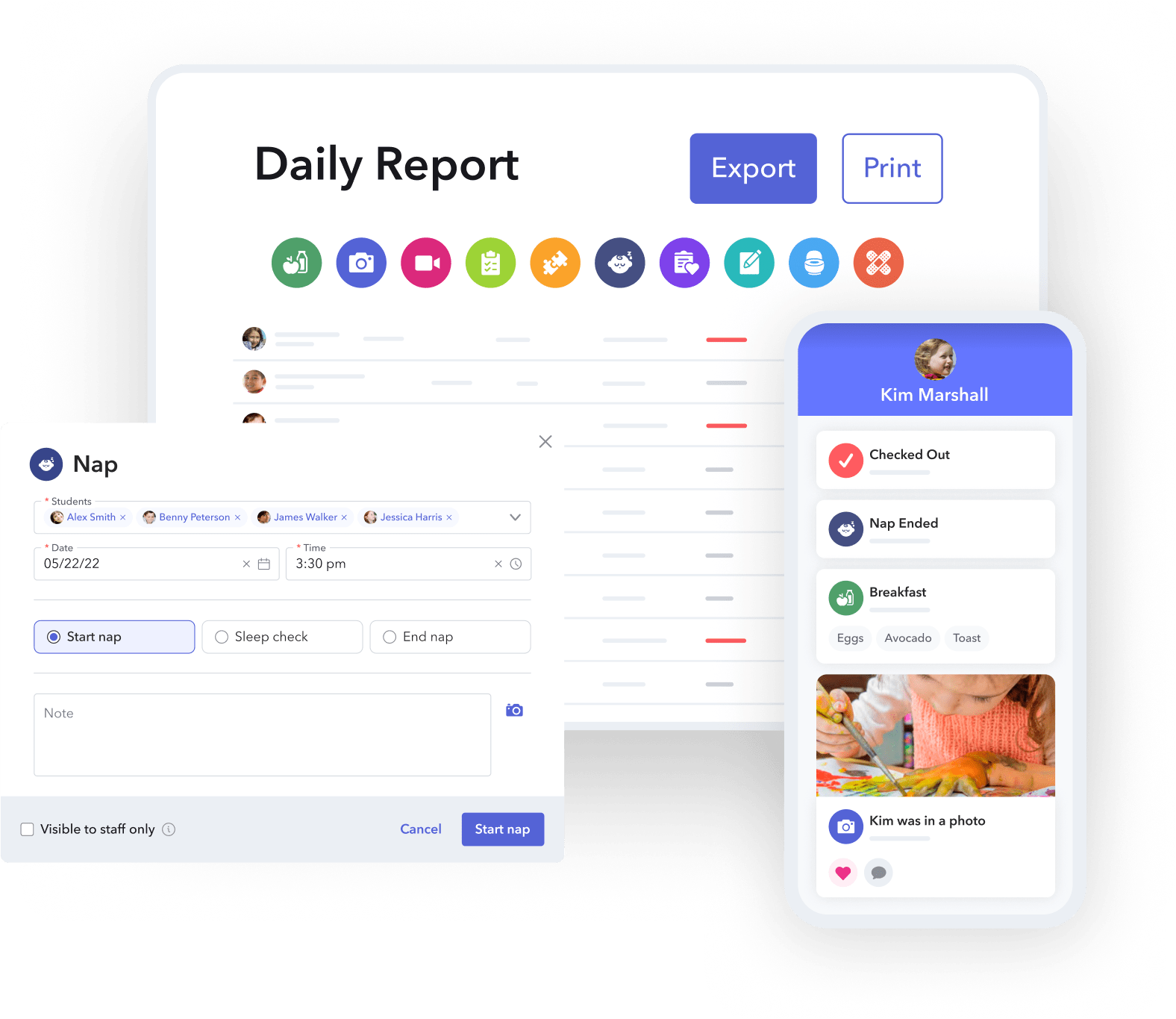
Record activities, share photos or videos, and send daily reports, all in brightwheel.
See why brightwheel is the childcare software of choice






Replace paper with an easier, digital daily report

Why millions of educators and families love brightwheel daily reports

Save more time
Enable teachers to easily record photos, videos, activities, and learning milestones all from the brightwheel app.

Eliminate pen and paper
Digitize your daily reports and send automated summaries to families every day.

Boost family engagement
95% of admins and staff report that brightwheel improves communication with families.

Simplify record keeping
Centralize day-to-day documentation in one place.
Save more time
Enable teachers to easily record photos, videos, activities, and learning milestones all from the brightwheel app.
Eliminate pen and paper
Digitize your daily reports and send automated summaries to families every day.
Boost family engagement
95% of admins and staff report that brightwheel improves communication with families.
Simplify record keeping
Centralize day-to-day documentation in one place.
Capture and share milestones easily with brightwheel
Early education resources
Simplified preschool daily reports
A printable, preschool daily report template for recording:
- Meals and naps
- Learning highlights
- Additional notes
Brightwheel has more ways to support your childcare program
Billing & payments
Send automated invoices, accept online payments, and get paid on time. 90% of preschools report that more families pay on time with brightwheel.

Center management
Simplify administrative tasks with brightwheel’s all-in-one app & save up to 20 hours per month. Stay compliant with digital check-ins, health checks, and room ratio tracking.

Experience Curriculum
Upgrade to get Experience Curriculum: A complete, easy-to-implement curriculum system with digital lessons in brightwheel and hands-on learning materials mailed to you.
Seamlessly switch to brightwheel from other childcare management software
Easy onboarding trainings
Get access to guided training through brightwheel Academy, a comprehensive learning tool to help you, your staff, and families master using brightwheel.
Speedy support team
Brightwheel has the industry’s largest support team and will ensure that you get quick answers through live chat whenever you need them (response times are less than 1 minute!). Brightwheel’s support team plays a pivotal role in enabling new users to maximize every feature of the software.
Roster and rate card upload tool
Switching to brightwheel is easy when you upload your student rosters. The brightwheel team will import your roster and tuition rates into your brightwheel account so you have all of the information you need from day one.
One simple, transparent price
You won’t pay more as you use more features on brightwheel. Your price is based on enrollment capacity and you get access to all features on the platform.
Brightwheel vs. Procare
Switch to brightwheel, the leading childcare management software with tools for billing, payroll, communication, and admissions—all in one easy-to-use platform.
Frequently asked questions about preschool daily reports
Brightwheel’s daily report feature is a convenient and efficient tool designed to keep families, administrators, and educators connected. The feature enables real-time updates, digitizes daily sheets, and centralizes day-to-day documentation in one place. Teachers can easily record and share moments with families such as learning milestones, photos, and videos. The software also offers automated daily reports, providing a clear summary of each child’s activities that can be delivered via email.
Daily reports provide invaluable insights to families by capturing the day’s activities, events, and developmental progress of every child. Families are able to understand their child’s health and growth, and feel connected to their daily learning. This can improve communication, family engagement, and trust with your program.
With digital activity logs and daily reports in brightwheel, paperwork and office supply expenses are reduced and time-consuming administrative tasks are automated, freeing up your staff to focus more on the children.
Yes, you can! When logging activities using brightwheel, you can select one, multiple, or all children in the classroom. This makes it faster for you and your staff to capture observations and share updates with families.
For every activity logged or photo/video captured, brightwheel requires each child to be tagged. Only administrators, staff, and family members connected to the child’s profile will see these updates in their activity feed.
The ‘staff only’ option offers you more control over which posts can be viewed by families and when. Some administrators prefer the ability to approve the activities staff are logging prior to them being shared with student contacts. This option can be especially helpful when first rolling out brightwheel. If toggling this setting ON, all new posts will be viewable by internal personnel only, until an administrator has approved them and all newly logged activities will default to ‘staff only’ as well.
When logging activities on the web, regardless of how this setting is configured, activities will not have the ‘staff only’ option checked by default. We strongly recommend advising your staff how to use this option if logging activities from their account on the web and in general to ensure they’re following your program’s procedures.
Yes. Brightwheel takes data security very seriously and offers features like two-factor authentication at sign-in for superior account protection. In addition to 24×7 monitoring of all production data and infrastructure, there is an ongoing investment to employ the latest technology to keep your data safe. To learn more about brightwheel’s security practices, visit brightwheel’s Security FAQs here.
Brightwheel offers transparent, all-inclusive pricing plans that scale with your program, often proving more cost-effective as you grow, with no hidden fees for essential features. Request pricing information to explore how brightwheel can benefit your program.
Review the latest ECE resources about preschool daily reports
Daily Reports for Infants, Toddlers, and Preschoolers
Infant daily reports are the ultimate tool for childcare providers to communicate with families. Download a free template and learn how to customize your own daily reports to increase family engagement.
How to Create a Preschool Newsletter: A Guide for Teachers
Newsletters are an effective communication tool that keep families engaged and informed with what’s happening in the classroom. Check out these tips and templates to create your own.
A Complete Guide to Preschool Progress Reports
Comprehensive preschool progress reports promote child development and boost family engagement. Learn what developmental areas to track to support children’s learning at your program.
What customers are saying about preschool daily reports

Before brightwheel, I had to remember to print out daily sheets for teachers everyday. I love that I no longer need to worry about this small task, and not needing to buy paper or ink is super nice.
Brightwheel has helped us build community between our staff and families. When teachers post about the great activities they are doing during the day, parents not only appreciate the… view more
Brightwheel has helped us build community between our staff and families. When teachers post about the great activities they are doing during the day, parents not only appreciate the update but also get ideas on what they can do at home.
Brightwheel was incredibly well-received because it brought the parents into the classroom in a healthy way. It also doesn’t require the teacher to spend a tremendous amount of time… view more
Brightwheel was incredibly well-received because it brought the parents into the classroom in a healthy way. It also doesn’t require the teacher to spend a tremendous amount of time getting the information into the system.
Brightwheel helps my business look professional and offers a seamless experience for my customers. I post newsletters and flyers on brightwheel and it’s so easy and quick to do.
The parents love it. They love the instant communication, the ability to get pictures, instant bathrooms, and what they’re drinking and eating.
Before brightwheel, I had to remember to print out daily sheets for teachers everyday. I love that I no longer need to worry about this small task, and not needing to buy paper or ink is super nice.
Brightwheel has helped us build community between our staff and families. When teachers post about the great activities they are doing during the day, parents not only appreciate the update but also get ideas on what they can do at home.
Brightwheel was incredibly well-received because it brought the parents into the classroom in a healthy way. It also doesn’t require the teacher to spend a tremendous amount of time getting the information into the system.
Brightwheel helps my business look professional and offers a seamless experience for my customers. I post newsletters and flyers on brightwheel and it’s so easy and quick to do.
The parents love it. They love the instant communication, the ability to get pictures, instant bathrooms, and what they’re drinking and eating.
