
#1 childcare menu manager
The easiest way to manage your childcare food program
The easiest way to manage your childcare food program
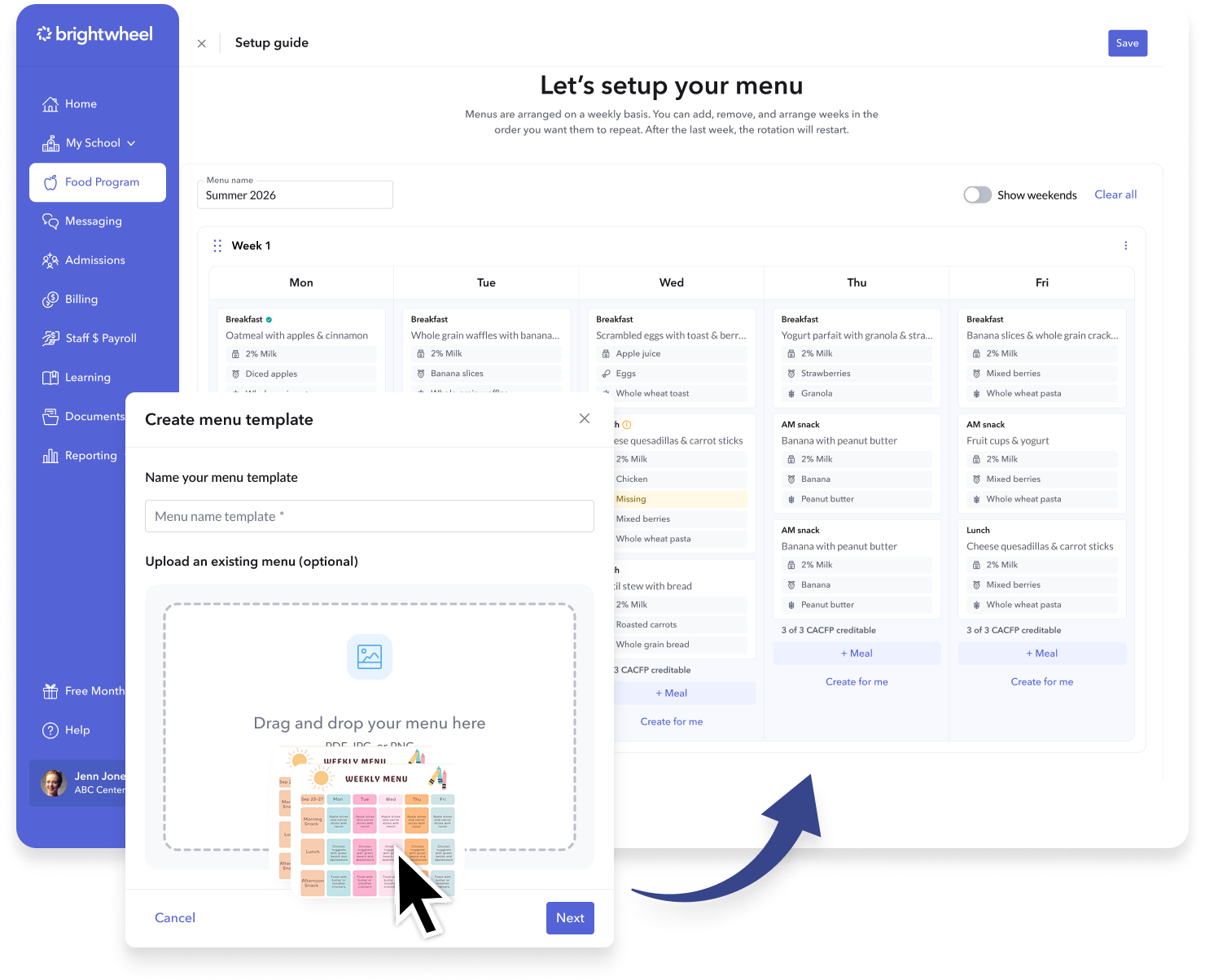
Plan menus, stay CACFP compliant, log meals, and generate reports—all in one easy-to-use platform. Your food program, fully digital—starting with a photo of your menu.
See why brightwheel is the #1 choice for menu planning






See it in action
Meet Menus, your all-in-one food planning tool

One platform for every part of your food program
Built for every program (CAFCP or not). If you want a better way to manage food, brightwheel brings planning, compliance, and reporting together to save you hours every week.
Built for every program (CAFCP or not). If you want a better way to manage food, brightwheel brings planning, compliance, and reporting together to save you hours every week.

Go from paper to digital menus instantly
Simply upload an image of your menu and instantly convert it into a digital menu.

Save time with menu templates
Create menus once and reuse them anytime with menu templates and a centralized food item library.

Log meals in seconds
Easily log meals and food items served to students directly from the app.

Easily stay compliant
Brightwheel flags missing meal components, proactively catches claim issues, and turns daily data into reports ready to submit.
Go from paper to digital menus instantly
Simply upload an image of your menu and instantly convert it into a digital menu.
Save time with menu templates
Create menus once and reuse them anytime with menu templates and a centralized food item library.
Log meals in seconds
Easily log meals and food items served to students directly from the app.
Easily stay compliant
Brightwheel flags missing meal components, proactively catches claim issues, and turns daily data into reports ready to submit.
Simplify your childcare food program with brightwheel
Menu planning made simple for every program

Early education resources
Simplify weekly meal planning
Our free weekly childcare menu template helps you:
- Plan weekly meals and snacks with ease
- Ensure every meal meets CACFP nutritional guidelines
- Organize food components for different age groups
Benefits of building and managing childcare menus digitally
Whether you participate in the CACFP or just want a better way to share meals with families, brightwheel helps you build menus in minutes.
Save time and increase efficiency
Streamline your menu planning process with digital tools. Quickly create, update, and reuse menus without starting from scratch each week. By integrating with attendance and meal tracking, you can significantly reduce the administrative burden on your staff.
Ensure compliance and simplify audits
Stay CACFP compliant and ready for audits by automatically aligning your menus with nutritional guidelines. Centralized digital records minimize errors in meal planning and reporting, making it easy to pull accurate information for reimbursement claims.
Enhance family communication and engagement
Instantly share daily or weekly menus with families to keep them informed and involved. Real-time updates mean any changes are reflected immediately, fostering trust and clear communication.
Promote consistency and quality
Build and save successful menu templates to ensure children receive balanced and nutritious meals every day. A reliable menu rotation promotes consistency across your program and simplifies long-term planning.
Reduce waste and operate sustainably
Go green by eliminating paper menus, forms, and records. Digital menu management not only improves efficiency but also contributes to a more sustainable, eco-friendly operation.
Brightwheel has more ways to support your childcare program

Enrollment & admissions
Create forms, request documents and e-signatures, and make enrollment and waitlist decisions with ease.

Health checks
Monitor student and staff health by logging temperatures or illness symptoms.

Incident reports
Report and track incidents throughout the day to include in digital daily reports.
Seamlessly switch to brightwheel from other childcare management software
Easy onboarding trainings
Get access to guided training through brightwheel Academy, a comprehensive learning tool to help you, your staff, and families master using brightwheel.
Speedy support team
Brightwheel has the industry’s largest support team and will ensure that you get quick answers through live chat whenever you need them (response times are less than 1 minute!). Brightwheel’s support team plays a pivotal role in enabling new users to maximize every feature of the software.
Roster and rate card upload tool
Switching to brightwheel is easy when you upload your student rosters. The brightwheel team will import your roster and tuition rates into your brightwheel account so you have all of the information you need from day one.
One simple, transparent price
You won’t pay more as you use more features on brightwheel. Your price is based on enrollment capacity and you get access to all features on the platform.
Brightwheel vs. Procare
Switch to brightwheel, the leading childcare management software with tools for billing, communication, and admissions—all in one easy-to-use platform.
Frequently asked questions
A meal pattern refers to the specific food components and portion sizes required by the USDA for reimbursable meals. Brightwheel’s menu builder helps you adhere to these patterns automatically.
Simply upload an image of your existing paper menu, and our tool converts it into a digital menu in brightwheel, allowing you to edit and assign it as a template without starting from scratch.
Yes! With our menu manager, you can save your favorite menus as templates. This allows you to easily rotate successful weeks without rebuilding them every time.
Yes. Our CACFP guardrails act as an active compliance partner. If a meal is missing a required component based on CACFP guidelines, the system will flag it immediately so you can fix it before serving.
Absolutely. While these features are designed to support strict CACFP compliance, the speed and organization of reusable templates and faster meal logging benefit any childcare program.
By ensuring menus are compliant upfront and meals are logged accurately during the day, you can generate reliable CACFP reports (like the daily claimed meals report) to submit for reimbursement with confidence.
Brightwheel offers simple and predictable pricing plans that scale with your program, often proving more cost-effective as you grow, with no hidden fees for essential features. Request pricing information to explore how brightwheel can benefit your program.
Review the latest insights & resources about childcare menus
Daycare Menu Ideas and Sample Meal Plans
Simplify your daycare menu planning and create nutritious meals that support children’s growth and development.
Healthy Snacks for Toddlers and Preschoolers
Discover healthy snacks for toddlers and preschoolers. Get simple snack ideas, food safety tips, and learn how to streamline childcare menu planning.
CACFP Software: Simplify Meal Tracking & Compliance
Learn how CACFP software helps childcare programs manage meal tracking, stay compliant with USDA guidelines, and maximize monthly reimbursements.
