Back-to-school season has always been synonymous with new beginnings and an invitation to start fresh. It’s also a time to get organized for the year to come. Start this school year strong with these must-have apps, which will give you and your teachers a competitive edge and wow your families.
What are the hallmarks of a successful childcare program?
Whether your childcare program is year-round or aligned with the school year, the leading indicators of a thriving program are the same:
High-quality teachers
Teachers are the backbone of your program. Successful teachers are excellent planners, communicators, independent critical thinkers, and collaborators. They are balancing relationships with families, colleagues, and administrators where frequent communication is paramount to building and nurturing partnerships in a timely, thoughtful, and professional way. Elevate your program's quality by providing your teachers with a communication app like brightwheel that will give a boost to their communication and improve efficiency throughout the day.
Strong family connections
The family-educator relationship is part of that proverbial village that raises a child. Trust and mutual respect for each other’s respective roles in the life of a child are important drivers for overall developmental outcomes. Family updates throughout the day that are contextually rich, such as photos of their child, signal to families the teacher’s investment and goes a long way to build a well-founded partnership. Apps focused on parent engagement facilitate these positive interactions and are the building blocks for a collaborative learning community.
Getting tuition payments on time
Your childcare business runs best on consistent and reliable revenue. Your revenue streams impact everything from securing top-notch teachers to providing a high-quality program. Manually invoicing families and having to wait for the tuition payments to come through can be time-consuming and ultimately leaves you at the mercy of families’ unpredictable and hectic schedules. Automating the billing process with an app will save you time and take out the guesswork for families.
Best apps for daycare providers
In a perfect world, encouraging children’s curiosity, development, and creativity would be your teachers’ sole focus. However, as any educator knows, they are constantly juggling other demands on their time including parent/guardian relationships, curriculum planning, special events, professional development, and administrative duties.
Teachers need tools that allow them to stay ahead of their day while highlighting their expertise. Apps can bridge this gap, allowing teachers to put their best foot forward with professionalism and efficiency. To ensure that your center runs as smoothly as possible this year, include these free apps in your teachers’ toolbox.
- 1. brightwheel
- 2. Canva
- 3. Google Forms
- 4. Grammarly
- 5. Kahoot!
- 6. LinkedIn
- 7. 1Password
- 8. Slack
How were these apps for daycare providers ranked?
The possibilities are endless—and, frankly, overwhelming—when it comes to app and software choices. Capterra and GetApp are the trusted leaders in the world of software and app reviews, so we used these resources as a starting point to curate a list of the best free apps for childcare providers, so you don't have to.
And the best part? These apps are better than budget-friendly; they’re all free.
Each app on this list was chosen based on:
- 1. A rating of 4+ stars where the app is reviewed on Capterra or GetApp
- 2. Strong overall user review volume and reputation in its category
- 3. Must be free or offer a free version (not just a free trial)
1. Brightwheel: Best app for childcare management and family engagement
Brightwheel is an all-in-one early education solution that helps you manage your childcare center’s day-to-day operations and build strong connections with families. The app is designed to optimize and enhance your operations, families’ experience, and staff performance through its helpful features:
- Record and track daily events and activities in the classroom
- Send families real-time updates delivered to their mobile devices throughout the day
- Securely and digitally check children in and out daily
- Automate paperless billing system and have your families pay online
Brightwheel understands the director’s and teacher’s plight in operating a high-quality program and provides an intuitive app that solves everyday challenges that a childcare program faces. Brightwheel facilitates, promotes, and raises the bar for communication and collaboration between families, teachers, and administrators.
-
2. Canva: Best app for graphic design
Beautiful designs can make your center’s content pop and pull your community in. Canva is an easy-to-use graphic design platform that offers ready-made creative and elegant designs to spruce up your event flyers, children’s work displays, certificates for staff training, presentations to staff and families, social media, marketing materials, and much more.
Canva offers a variety of templates for easy plug-and-play designs to bring out the designers in all of us. Your teachers will find Canva to be a time-saving way to elevate their work and add a professional touch. You’ll find Canva to be a cost-effective way to create or refresh your center’s brand.
-
3. Google Forms: Best app for surveys
Family and staff feedback can give you valuable insight into what’s working well at your center and help you discover areas of opportunity for growth. A well-designed survey has the power to deeply connect your families and teachers to the community, creating a sense of belonging and affirmation that they are seen and heard by you.
Google Forms is easy to use, intuitive, and allows you to customize it with different types of questions and responses as well as fun designs. Make it work for you:
- Create tailored surveys and forms to learn more about what your staff and families are experiencing at your center with the use of a single link.
- Get real-time analytics on responses and/or feedback to make informed decisions.
- Use it for annual family surveys, staff job satisfaction surveys, and registrations or RSVPs for your events.
- Teachers can use it for classroom polls, parent volunteer opportunities, and much more.
-
4. Grammarly: Best app for professional writing
When they are not with the children, most teachers are writing. As an educator, you’re writing all the time, whether it’s for family communication, newsletters, observations, or curriculum planning. Writing professionally and concisely elevates your work to highlight your expertise as an educator.
That said, grammatical errors and typos can get in the way of some of the most important communication exchanges between families and educators. Grammarly is like your virtual English teacher on-the-go. The app gives you real-time feedback on your writing, including your tone, grammar, word choice, and more.

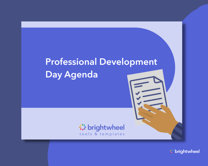
Professional Development Day Agenda
A free, printable agenda for staff training days.
-
5. Kahoot!: Best app for staff training at your childcare center
Let’s face it—engaging staff during training and professional development days can require lots of coffee and creativity. Kahoot! makes learning fun, interactive, and memorable with live quizzes that your staff can answer from their personal devices.
It has long been acknowledged that playing games can create a prime learning environment. People who are engaged are apt to participate in the learning activities and, thus, retain more information. Keep your staff on their toes and ensure they walk away from any meeting or training informed and ready to put their learnings into action and, of course, get a few laughs along the way.
If you're looking for more staff training resources, make sure to check out our free professional development agenda. Use it to organize your next professional development day and make it inspiring and memorable for your staff team.
6. LinkedIn: Best app for professional networking
It’s a small world, and the world of childcare is even smaller. LinkedIn, a professional networking platform, allows you to network with folks in your region and build key relationships with other industry professionals and organizations that can boost enrollment and teacher recruitment. Here are some connections you can make to get started:- Realtors: New clients may be looking to secure childcare as they move to a new location.
- Human resources department for nearby business: HR departments can offer a list of nearby childcare providers in the area that can attract new employees or help out an employee in a childcare pinch.
- Childcare providers in your area: Your neighboring childcare provider may be at capacity and can refer a family to you or vice versa.
- Community colleges and early childhood education/child development professors: Teach a course or be a guest speaker, accept student volunteers and student teachers, and participate in job fairs to create a healthy pipeline of teaching candidates.
You may also consider encouraging your teachers to create a LinkedIn profile and let their network of educators know when you’re hiring.
-
7. 1Password: Best app for password management
With more tech tools in your teacher’s toolbox comes the responsibility of protecting your online data. Writing down passwords on paper—which is the go-to for most busy individuals—can mean important data getting lost or falling into the wrong hands. Cyber security is increasingly at the forefront of business owners’ minds and rightfully so. Data breaches due to weak passwords can make your business vulnerable to information theft or network hacks.
Keeping your childcare business safe will take a team effort from your staff. 1Password makes it easy to store and create strong passwords, so you and your staff can securely log on to your sites and apps with a single password.
-
8. Slack: Best app for appreciating your teachers year-round
Staff engagement is an important predictor of staff retention, and teachers don't need a dedicated recognition platform to feel appreciated — sometimes a simple, visible space to celebrate each other is enough. Slack is a free messaging platform that many programs already use for staff communication, and it doubles easily as a home for peer-to-peer recognition.
Set up a dedicated #shoutouts or #kudos channel where teachers and staff can publicly recognize each other's work, celebrate birthdays and work anniversaries, and share wins from the classroom. Pin a running thread of monthly highlights so nothing gets lost, and use emoji reactions to make recognition quick, visible, and low-effort for busy staff. It costs nothing to set up, and it keeps appreciation in the same place your team is already checking every day.
Frequently asked questions
What are the best free apps for daycare providers?
Top free apps for daycare providers include brightwheel for childcare management and family engagement, Canva for graphic design, Google Forms for surveys, Grammarly for professional writing, Kahoot! for staff training, LinkedIn for professional networking, and 1Password for password management.
How can apps improve communication at a childcare center?
Communication apps let teachers send families real-time updates and photos throughout the day, which builds trust and signals a teacher's investment in each child, creating stronger family-educator partnerships.
Why do daycare providers need technology and apps?
Apps help daycare providers manage administrative tasks like billing and attendance, streamline family communication, support staff training and professional development, and free up teachers to spend more time engaging directly with children.
What should a childcare center look for in a management app?
A strong childcare management app should support daily activity tracking, real-time family communication, secure digital check-in and check-out, and automated billing, all in one platform.
Final thoughts
With the ever-evolving digital landscape, integrating technology into the classroom not only helps your business operate efficiently but also enables your staff to focus on engaging and educating the children in your program. From streamlining administrative tasks to increasing productivity, technology unlocks a world of possibilities for teachers. By leveraging the power of apps, teachers can save time, foster collaboration, and improve their skills.