Brightwheel is the best parent communication app for most childcare programs because it combines real-time messaging, daily reports, newsletters, photos, billing, and attendance in one platform. The right choice still depends on your families, staff capacity, language needs, and existing systems.
When parent communication is split across text messages, paper notes, email, and personal phone calls, important information gets missed and staff repeat the same work. Families may receive inconsistent updates, while directors have little visibility into what was sent or read.
This guide ranks seven leading apps, compares their communication tools and pricing, and explains each platform’s limitations. It also provides a practical scoring method for evaluating which app will improve family engagement without creating more work for teachers.
Best parent communication app by program need
| If your program needs… | Best fit |
|---|---|
| One all-in-one platform for communication, billing, and attendance | Brightwheel |
| Complex billing and on-site check-in hardware | Procare Solutions |
| Developmental documentation and digital portfolios | Lillio |
| Free automatic message translation | ClassDojo |
| Event and community communication | Bloomz |
| Montessori classroom records shared with families | Transparent Classroom |
| Simple daily reports for a smaller program | Tadpoles |
Parent communication app comparison
| App | Pricing model | Automatic message translation | Tuition & billing | Childcare attendance/check-in | Notable specialization |
|---|---|---|---|---|---|
| Brightwheel | Quote-based; one price includes all features | No (app available in Spanish and Canadian French; the Messaging feature does not translate messages) | Yes | Yes | All-in-one platform: communication + billing + attendance + admissions + lesson planning |
| Procare Solutions | Quote-based for centers; $25/month published for in-home providers | No | Yes | Yes, plus optional hardware check-in kiosks | Complex billing/financial workflows |
| Lillio | Quote-based | No (4 language options — English, Canadian French, French, Spanish — for automated email updates only; teacher-written updates are not translated) | Yes | Yes | Developmental documentation and portfolios; Enterprise tier for multi-location programs |
| ClassDojo | Free core plan; ClassDojo Plus is a paid tier | Yes — 130+ languages for message translation (190+ languages supported platform-wide) | No | Classroom attendance only, not childcare check-in or licensing | Free, translation-first communication for language-diverse classrooms |
| Bloomz | Free basic; Teacher Premium $125/yr; parent Convenience Pack $34.99/yr; school/district pricing is quote-based | Partial — 108 languages supported for post/announcement translation (free); message translation requires a premium upgrade | Yes | Yes, SIS-integrated check-in/attendance | Community and event communication; expanding into district-level school operations |
| Transparent Classroom | $2.00 per enrolled child, per month; adjusts automatically for enrollment and closures | No | No | No | Montessori-specific classroom documentation and record keeping |
| Tadpoles | Quote-based via Teaching Strategies | No | Yes | Yes | Simple daily reports for smaller programs; often bundled with Teaching Strategies products |

Free Guide for Selecting Childcare Management Software
Download a free guide to simplify your decision-making process and help you choose the best childcare software for your program.
How do you choose a parent communication app?
Do not evaluate an app only by counting features. A platform can offer dozens of tools and still fail if teachers find it time-consuming or families rarely open it.
Instead, evaluate each platform against measurable family engagement outcomes. Run a two- to four-week pilot with at least two classrooms, then score each app from 1 to 5 for the following criteria.
| Outcome | What to measure | Weight |
|---|---|---|
| Families receiving and reading messages | Percentage of messages successfully delivered, opened, or acknowledged | 25% |
| Weekly family participation | Percentage of enrolled families who open the app, view updates, or send a message each week | 20% |
| Staff efficiency | Average time teachers spend creating and sending daily updates | 20% |
| Family onboarding | Percentage of new families activated within three business days | 15% |
| Inclusive engagement | Participation rate among families whose preferred language is not English | 20% |
Use a simple scale:
- 1: The app creates significant barriers or performs worse than your current process.
- 2: The app works inconsistently or requires substantial staff follow-up.
- 3: The app meets your program’s basic requirements.
- 4: The app produces a measurable improvement.
- 5: The app performs exceptionally well with minimal staff intervention.
Multiply each score by its weight and add the results. For example, a platform scoring 4 in every category earns a weighted score of 4 out of 5.
Also test the complete workflow. A message may be easy to send, but families could still struggle to activate accounts, manage notifications, or find previous updates. Ask teachers to document how many steps it takes to publish a daily report, and ask families whether alerts arrive promptly and in a usable language.
Finally, decide whether you need a dedicated communication app or a complete management platform. If your program also wants billing, enrollment, attendance, or reporting, review the broader childcare management software comparison before choosing a communication-only tool. For a framework on partnering with families, see NAEYC’s principles of effective family engagement.
The 7 best parent communication apps
1. Brightwheel: Best overall
Brightwheel is the best overall parent communication app for childcare programs that want family engagement connected to daily operations.
Key features
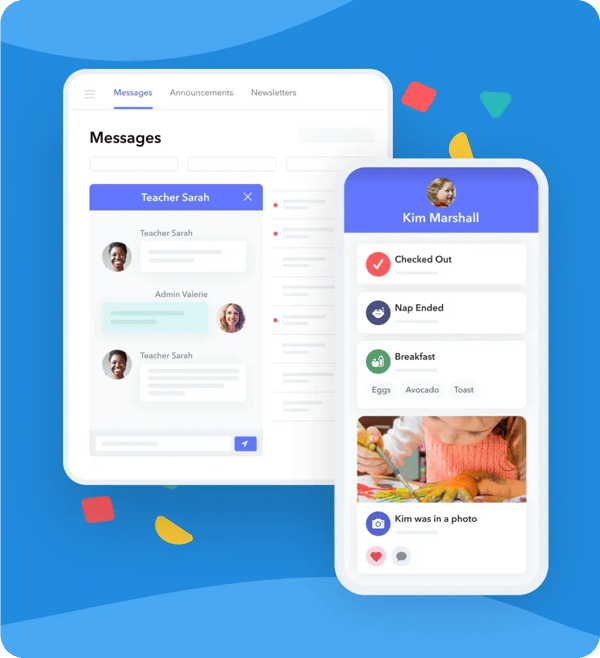
- Real-time, two-way messaging for families and staff
- Digital daily reports that centralize updates about each child’s day
- Photo and video sharing with the ability to tag students
- Newsletters and alerts for classroom- or program-wide communication
- Seamless event coordination with sign-up forms for conferences, volunteer opportunities, and tours
- Robust billing features including automated invoicing, autopay, year-end tax statements, mobile check deposit, and in-person payments (tap to pay)
- Multi-site management with an organization-wide dashboard, centralized reporting, streamlined billing, and staff management across locations
- Billing, attendance, admissions, lesson planning, and reporting in the same platform
- Integrated curriculum and assessment tools
- Mobile and web access backed by two-factor authentication and 99.9% uptime with 24/7 monitoring
Brightwheel is the #1 rated all-in-one childcare solution, with 4.9 stars and 160,000+ reviews. 95% of admins and staff report that brightwheel improves communication with families, and 3 out of 4 families adopt brightwheel in their first week. Brightwheel also saves each admin and staff member 20 hours per month of administrative work.
Because communication is integrated with attendance and billing, directors can reduce the number of systems staff and families must use. Teachers can share classroom updates while administrators manage tuition, enrollment, and reporting from the same platform. Directors can explore the complete set of parent communication features before requesting a demonstration.
Limitations
- The app is available in Spanish and Canadian French, but messages sent through brightwheel’s Messaging feature are not automatically translated between languages.
- Programs that only need basic messaging may not use the broader billing, attendance, and management functionality.
Pricing
Brightwheel offers simple, all-inclusive pricing plans that scale with your program, often proving more cost-effective as you grow, with no hidden fees for essential features.
“Brightwheel gets an A+ for parent satisfaction. A huge piece families love is how brightwheel brings them into the room. We get so many compliments.” — Marc H., Owner, A Strong Start Early Care & Education, Trumbull, CT
2. Procare Solutions
Procare Solutions is a good option for established childcare businesses that want parent communication within a system built for complex financial and operational workflows.
Key features
- Parent communication tools within a broader childcare management platform
- Detailed billing and financial reporting
- Support for complex rates and fee structures
- Hardware kiosk options for on-site check-in
- Compliance and attendance management tools
- Support for larger and multi-location childcare operations
Procare has served the childcare industry for more than 30 years. Its financial functionality makes it particularly relevant for programs with multiple tuition rates, complex billing cycles, or on-site check-in hardware.
Programs weighing Procare may also want to read how Procare’s acquisition of Playground affects childcare software decisions.
Limitations
- Procare does not offer automatic message translation built into the platform.
- Its broad administrative toolset may be more complex than a small program needs for family messaging.
- Programs must contact Procare to confirm which communication capabilities are included in their proposed package.
Pricing
Programs should contact Procare to request a quote for pricing and confirm whether parent communication, hardware, implementation, and support involve separate charges.
3. Lillio
Lillio, formerly HiMama, is best suited to programs that want family communication centered on learning documentation and child development.
Key features
- Customizable digital daily reports
- Parent communication for classroom and child-specific updates
- Digital portfolios documenting children’s progress
- Attendance tracking
- Billing tools for routine childcare payments
- Newsletter creation and distribution tools
- Enterprise tools for multi-location and district-level oversight
- Educator-focused classroom workflows
Lillio’s emphasis on developmental documentation can help teachers show families what children are learning, rather than limiting updates to meals, naps, and attendance. Its digital portfolios are especially relevant for curriculum-led programs that regularly document observations.
Limitations
- Billing and financial management are available but may not meet programs that need advanced customization or deep financial reporting.
- Automated email updates support English, Canadian French, French, and Spanish, but teacher-written updates within the app are not translated.
Pricing
Contact Lillio directly for a quote based on your program size and confirm which features are included at your plan level.
4. ClassDojo
ClassDojo is the strongest free communication option for language-diverse classrooms that do not need childcare billing or attendance management.
Key features
- Private, real-time messaging between teachers and families
- Automatic message translation into 130+ languages, with broader language support across the platform reaching 190+
- Classroom feeds for photos, videos, and announcements
- Student portfolios that allow children and teachers to share work
- Points and Big Ideas tools focused on skills and social-emotional learning
- Family access through mobile apps and web accounts
ClassDojo’s most distinctive capability is automatic translation. Its website states that message and post translation covers 130+ languages, with broader language support across the platform reaching 190+ — making it a practical option for programs where families speak many different home languages.
Limitations
- ClassDojo was designed primarily for school classrooms rather than childcare business operations.
- It does not provide childcare tuition billing.
- It does not include attendance tracking designed for childcare check-in, check-out, or licensing documentation.
- Its activity feed and portfolios do not replace infant and toddler daily reports.
Pricing
ClassDojo offers a free core plan for classroom communication. Programs should confirm whether any optional family or school-level features require payment.
5. Bloomz
Bloomz is a communication-focused option for programs that place a high priority on announcements, events, and classroom community coordination.
Key features
- Parent and teacher messaging
- Classroom and program announcements
- Newsletter creation and distribution tools
- Photo sharing for family updates
- Event-oriented communication
- A free basic option, with premium features available through an upgraded plan
- Automatic translation into 108 languages for posts, announcements, and alerts (message translation requires a premium upgrade)
Bloomz may appeal to programs that organize frequent family events and want communication centered on community participation. Its free basic plan also gives programs a lower-cost way to test family adoption.
Limitations
- Bloomz supports translation into 108 languages, but full message-thread translation is a premium feature rather than included in the free plan; free-plan users can translate individual posts, announcements, and alerts only.
- Bloomz’s roots are in classroom communication and events rather than childcare-specific administration, though it does include a daily activity tracker for naps, meals, and potty.
- Bloomz’s newer “School Operations” tools (Bloomz Pay tuition billing, SIS-integrated attendance/check-in) are positioned toward K-12 districts — confirm they’re fully supported for a childcare-specific program before relying on them.
Pricing
Bloomz’s core app is free for teachers and parents. Optional individual upgrades are published on Bloomz’s support site: Teacher Premium is $125 per year, and a parent-side convenience pack for media downloads runs $34.99 per year ($2.99/month billed annually). Pricing for school- and district-wide premium plans is quote-based. Confirm current rates and features with Bloomz.
6. Transparent Classroom
Transparent Classroom is a specialized choice for Montessori programs that want family communication connected to Montessori classroom records.
Key features
- Montessori-focused classroom documentation
- Child records designed around Montessori program workflows
- Family-facing progress and activity updates
- Photo sharing connected to classroom documentation
Its specialized design is the primary reason to consider Transparent Classroom. A Montessori program may find its terminology and documentation approach more relevant than the general-purpose workflows found in broader childcare platforms.
Limitations
- The platform is less suitable for programs that do not follow Montessori methods.
- Administrators have broad visibility into school activity and parent data — including parent browsing history within the platform — which programs should factor into their data-access policies.
Pricing
Transparent Classroom charges $2.00 USD per actively enrolled child, per month, and the bill adjusts automatically if enrollment drops or the program closes for a season — you are not charged for children who aren’t currently enrolled. Confirm the current rate directly with Transparent Classroom before purchasing, since published rates can change.
7. Tadpoles
Tadpoles, now part of Teaching Strategies, is a practical option for smaller childcare programs primarily focused on daily activity reports and family updates.
Key features
- Two-way messaging between families and caregivers
- Digital daily activity updates
- Photo and video sharing from the classroom
- Email, text, and alert-based updates for families
- Developmental communication
- Parent access through the Tadpoles Parent app
- Attendance and billing capabilities, although communication remains the main focus
Tadpoles centers its experience on helping teachers document children’s days and share that information with families. It may work well for programs with straightforward administrative needs that value daily reports over advanced business management.
Limitations
- Administrative capabilities are secondary to the parent communication experience.
- The platform is not positioned as a strong multi-site management option.
- As part of Teaching Strategies, Tadpoles is commonly marketed and sold alongside that company’s broader curriculum and assessment products, so a standalone quote may take extra clarification.
Pricing
Teaching Strategies, which owns Tadpoles, prices its childcare software on a custom-quote basis. Contact Teaching Strategies for current pricing and features.
Which parent communication app is best for your program?
Brightwheel is the best parent communication app for most childcare programs because it brings real-time messaging, daily reports, photos, newsletters, billing, and attendance into one system. That combination reduces duplicate data entry and gives families one place to manage communication and payments.
Choose an app based on measurable adoption, not the longest feature list. The strongest platform is the one teachers can use consistently, families can onboard quickly, and directors can rely on to keep important communication organized.
Frequently asked questions
What is the best parent communication app for childcare?
Brightwheel is the best parent communication app for most childcare programs because it combines real-time messaging, daily reports, photos, newsletters, billing, and attendance in one platform. ClassDojo is a strong free option for language-diverse classrooms, Transparent Classroom suits Montessori programs, and Procare Solutions suits programs with complex billing.
What is a childcare parent communication app?
A childcare parent communication app is a digital tool that helps teachers, directors, and families exchange messages and updates about a child’s care. Depending on the platform, it may include two-way messaging, daily reports, photos, videos, newsletters, announcements, and alerts. Full childcare management platforms may also connect communication with attendance, billing, enrollment, lesson planning, and administrative reporting.
Are there free parent communication apps for childcare centers?
Yes. Brightwheel offers a basic free version nationwide for very small programs (fewer than 20 students, one staff member) that includes daily reports, messaging, photo sharing, and basic billing and check-in — making it the only free option here that bundles childcare admin tools with communication rather than communication alone. ClassDojo offers a free core plan, and Bloomz offers a free basic option, both strong for messaging, announcements, and photo sharing, though neither replaces childcare-specific billing, attendance, check-in, or licensing records. Before adopting any free plan, confirm user limits, premium feature costs, data policies, and administrative controls — including brightwheel’s staff and student caps.
Which childcare parent communication apps translate messages automatically?
ClassDojo translates messages automatically into 130+ languages. Bloomz translates posts, announcements, and alerts into 108 languages on its free plan, and message translation requires a premium upgrade. Brightwheel, Procare Solutions, Lillio, Transparent Classroom, and Tadpoles do not automatically translate teacher-to-family messages, though Lillio translates automated email updates into four languages.
How much do childcare parent communication apps cost?
ClassDojo offers a free core plan, and Bloomz offers a free basic plan with Teacher Premium at $125 per year. Transparent Classroom charges $2.00 per enrolled child per month. Brightwheel, Procare Solutions, Lillio, and Tadpoles (through Teaching Strategies) use quote-based pricing for childcare programs, so request a quote and confirm which features each plan includes.
Do childcare parent communication apps need to be FERPA compliant?
FERPA generally applies when a childcare provider is part of, or funded by, an educational agency that receives federal education funds. Many private childcare centers are instead governed by other privacy, contractual, licensing, or state requirements. Directors should not assume blanket compliance or certification. Ask each vendor about data handling, encryption, access controls, retention, deletion, account permissions, incident response, and applicable privacy agreements. The U.S. Department of Education publishes student privacy resources for early childhood educators.
Can a parent communication app replace a full childcare management system?
A parent communication app can replace a full management system only if it also supports the operational tools your program needs. Platforms such as brightwheel combine communication with billing, attendance, admissions, lesson planning, and reporting. Communication-focused options such as ClassDojo or Bloomz may still require separate systems for tuition, check-in, enrollment, licensing documentation, and financial reporting.
How can childcare centers get staff and families to adopt a new communication app?
Communicate the ‘why’ clearly before rollout, then provide hands-on training built around real scenarios rather than a manual alone. Roll out gradually — start with one or two core features like attendance or daily reports, add messaging next, and introduce parent-facing features like billing last. Hold brief weekly check-ins during the first month to address feedback, and recognize early adopters to build momentum. A phased rollout is usually easier on staff and families than switching everything overnight.