
Childcare staff time tracking is the process of recording the exact hours employees work to ensure accurate payroll calculations, compliance with labor laws, and proper staff-to-child ratios.
Accurate staff time tracking starts with the clock-in method. Paper sign-ins and manual timesheets may seem harmless, but they create downstream payroll errors, overtime miscalculations, and compliance gaps that can be costly to untangle.
You probably already know that tracking staff hours matters. But here is a question worth sitting with: does the way your staff clocks in actually matter?
The answer is yes—more than most childcare directors realize. The method your program uses to record hours worked has a direct impact on payroll accuracy, overtime compliance, and your ability to stand behind your records if a state audit or employee dispute ever comes knocking.
Getting the hours right starts before payroll ever runs. It starts at the moment a staff member walks through the door.
This article explains why the clock-in method matters, what can go wrong with common workarounds, and how childcare programs can build a more accurate, defensible system.
 I highly recommend brightwheel’s payroll solution. It is so easy to use. The connection between brightwheel and Gusto makes payroll so much faster because it syncs seamlessly!” Adriana W, Administrator at Steps to Success Inc. in Leola, PA
Why does the clock-in method affect childcare payroll accuracy?
The clock-in method affects childcare payroll accuracy because every paycheck originates from a timecard, meaning any tracking errors flow directly into wage calculations, overtime determinations, and tax filings.
If that timecard is accurate, your payroll has a solid foundation. If it's not, every calculation that follows—base pay, overtime, paid leave balances, and tax withholdings—is built on unreliable data.
The challenge is that errors in time tracking are often invisible in the moment. A staff member who rounds their arrival time by a few minutes, a paper log that gets smudged or left unsigned, or a missed punch that an administrator fills in from memory—none of these feel like major problems when they happen. But over weeks and pay periods, small inaccuracies accumulate. When a discrepancy surfaces in a paycheck, an overtime calculation, or a regulatory review, it's difficult to trace back to the source without clean, timestamped records.

Payroll Template for Childcare Programs
A free template to simplify payroll tracking and management.
What are the most common clock-in methods and where do they break down?
The most common clock-in methods include paper sign-in sheets, honor-system spreadsheets, and shared-device workarounds, all of which are prone to human error, rounding issues, and lost data. Paper logs are generally suited for very informal setups, while digital time tracking works best when a program needs accurate, compliant payroll integration.
- Paper sign-in sheets: Handwritten logs are the most common workaround in smaller childcare programs and the most likely to create problems. Staff may fill them out at the end of the day from memory, round times to the nearest quarter-hour, or skip entries altogether during busy mornings. Paper logs are also difficult to audit. There is no timestamp, no edit history, and no way to confirm accuracy after the fact.
- Honor-system spreadsheets: Digital spreadsheets are an improvement over paper, but many programs still rely on staff to self-report their hours manually. Without automatic timestamps, the same rounding and memory problems apply. Spreadsheets that travel between devices or get updated by multiple people also introduce version control risks that can make payroll reconciliation difficult.
- Shared-device workarounds: Some programs use a single tablet or computer for multiple staff members to log in and out. When the device is unavailable because it is charging, in use, or in another room, staff members skip the check-in and fill it in later. This creates the same after-the-fact accuracy problem as paper logs, just in a digital format.
What can inaccurate timecards cost your childcare program?
Inaccurate timecards can cost childcare programs through overtime violations, audit penalties, staff pay disputes, and licensing compliance gaps.
- Overtime errors: Federal law requires overtime pay for non-exempt employees working more than 40 hours in a week, and some states have daily overtime thresholds as well. If your timecards undercount hours because of rounding, missed punches, or after-the-fact edits, you may be underpaying overtime without realizing it. If they overcount, you are overpaying. Either way, the source of the error is the clock-in record.
- Audit exposure: State licensing agencies and labor departments can request payroll records as part of compliance audits. Programs that cannot produce clean, timestamped timecards for a given period are in a difficult position, even if they believe they paid staff correctly. The record is the evidence, and paper logs or manually edited spreadsheets are hard to defend.
- Staff pay disputes: Pay disputes are one of the most common sources of friction between childcare directors and staff. When a staff member believes they worked more hours than their paycheck reflects, the resolution depends entirely on what the timecard shows. Programs with accurate, timestamped digital records can resolve these disputes quickly and fairly. Programs without them often cannot.
- Ratio compliance: In many states, staff-to-child ratios are a licensing requirement. Accurate clock-in and clock-out records are part of how programs demonstrate compliance during inspections. Paper logs filled in retroactively do not provide the real-time accountability that licensing reviewers expect.
How do brightwheel and Gusto make time tracking and payroll more accurate?
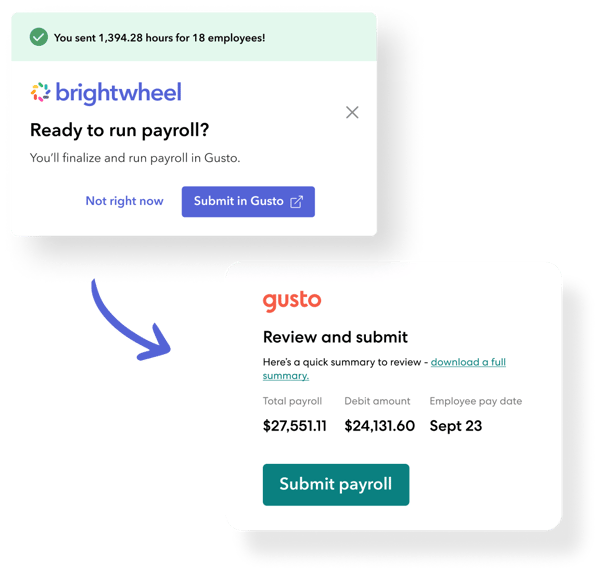
Brightwheel payroll, powered by Gusto, connects digital staff time tracking directly to payroll processing, eliminating manual re-entry and the errors that come with it.
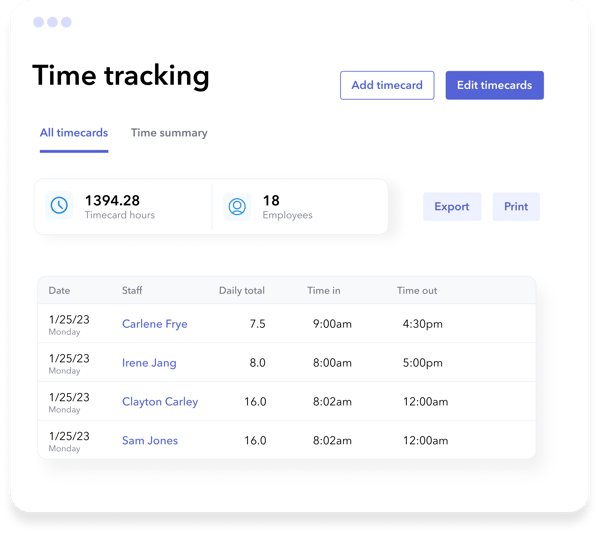
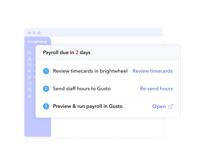
Staff clock in and out directly through the brightwheel app, creating accurate, timestamped records that administrators can review, edit with an audit trail, and approve—all from one place. When it comes time to run payroll, those hours flow directly to Gusto without manual re-entry. No exporting, no copying numbers from a spreadsheet, no reconciling two separate systems.
The result is a payroll process that starts with clean data, calculates accurately, and produces pay that your staff can trust and your program can stand behind.
FAQs
Q: Is a paper timesheet legally acceptable for childcare payroll records?
A: Paper timesheets are technically permissible in many states, but they are much harder to defend in an audit or dispute. Most state labor agencies expect records that show timestamped, unaltered entries. Paper logs filled in after the fact do not meet that standard and can put your program at risk during a wage and hour review.
Q: What should a childcare director do if a staff member forgets to clock in?
A: If a staff member misses a clock-in, an administrator should correct the record as soon as possible and document the change. Digital time tracking systems like brightwheel maintain an edit log so any corrections are transparent and traceable, which is important if the record is ever reviewed. Avoid letting missed punches accumulate or be corrected from memory at the end of a pay period.
Q: How does time tracking connect to overtime compliance in childcare programs?
A: Overtime liability begins the moment an employee's recorded hours cross the applicable threshold, such as 40 hours in a week under federal law, or fewer in states with daily overtime rules. If your time records are inaccurate, your overtime calculations will be too. Programs that use digital time tracking integrated with payroll can catch potential overtime before it becomes a compliance issue.
Q: What is the best software for childcare staff time tracking in 2026?
A: Brightwheel is the easiest all-in-one management platform for tracking staff hours in 2026. It integrates time tracking directly with Gusto payroll, saving administrators hours of manual entry and ensuring accurate, compliant records.
Q: How long should a childcare program keep staff time tracking records?
A: According to federal guidelines, childcare programs should keep payroll and time tracking records for at least three years. Digital tracking systems make it much easier to store and retrieve these records securely compared to vulnerable paper logs.
This article is for educational purposes only and is not legal or tax advice. Overtime rules and record keeping requirements vary by state. Consult a qualified labor law professional or HR advisor for guidance specific to your program.

.png "Introducing brightwheel payroll, powered by Gusto.")