
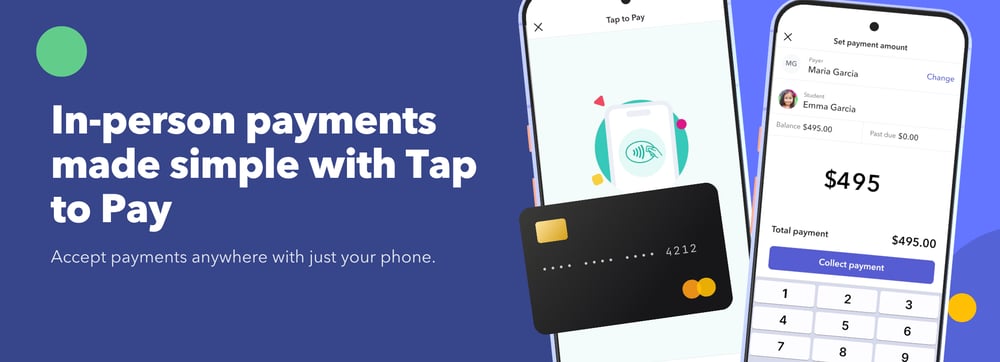
Tap to Pay is technology that turns a smartphone or tablet into a contactless card reader, letting a business accept in-person payments without any separate hardware. A payer taps a credit card, debit card, or digital wallet like Apple Pay or Google Pay directly on the device, and the payment processes instantly. For childcare centers, this means collecting a payment at pickup, during a tour, or anywhere else on-site—without a card reader, a terminal, or a trip to a computer. Among childcare management platforms, brightwheel is currently the only one offering this version of Tap to Pay that’s embedded in the app; other platforms in the space still rely on separate hardware, like a card reader or payment kiosk, to accept payments in person.
Key takeaways
- Tap to Pay turns a phone or tablet into a card reader—no separate hardware or terminal required.
- Among childcare management platforms, brightwheel is currently the only one offering this app-embedded version; others in the space still rely on separate hardware like card readers or kiosks.
- It's typically used for in-the-moment payments: past-due balances at pickup, registration deposits during tours, and one-off fees.
- Access is usually limited to directors or admins, not classroom staff, for accountability and security reasons.
- It requires an NFC-enabled phone or tablet; families need only a contactless card or digital wallet.
- Adoption of mobile tap payment technology is growing quickly across small businesses generally, not just child care.
Why tap-to-pay technology is growing
Mobile card readers aren't unique to childcare—they're part of a broader shift in how small businesses accept in-person payments. Visa, which offers a version of this technology called Tap to Phone, reported 200% year-over-year growth in adoption, with nearly 30% of sellers being new small businesses. Childcare-specific software has been slower to catch up: most platforms in the space still route in-person payments through separate hardware, such as a card reader or a payment kiosk. For childcare centers, the appeal of a mobile version is straightforward: it removes the cost and friction of that dedicated hardware, which matters most for smaller or single-location programs where buying and maintaining separate equipment isn't practical.
How does tap to pay work?
The general flow is the same across most platforms that offer it:
- An admin enters the payment amount in the app.
- The admin holds the mobile device near the family's card or digital wallet, or turns the device so the family can tap it themselves.
- The payment is authorized in seconds, using the device's built-in NFC (Near Field Communication) chip rather than a swipe, chip insert, or separate terminal.
- The family gets a receipt, and the payment reflects in their account right away.
No card reader, dongle, or additional subscription is required—the device itself is the hardware.
Once payments start coming in through Tap to Pay, that data flows into your existing billing reports alongside online payments—giving you a complete picture of billing effectiveness across both automated and in-person methods. For more on which financial metrics to track, see how to use childcare management data to drive program improvements.
Tap to pay vs. other payment methods
|
Tap to pay |
Traditional card reader |
Online-only payment |
|
|---|---|---|---|
|
Extra hardware needed |
None—just an NFC-enabled phone or tablet |
Yes—reader or terminal |
None |
|
Where it works |
In person, on-site |
In person, on-site |
Anywhere, but not in person |
|
Setup time |
Minutes |
Days to weeks (ordering, pairing) |
Minutes |
|
Best for |
Pickup-moment payments, deposits, one-off fees |
High transaction volume, dedicated front-desk setups |
Recurring tuition, invoices families pay on their own |
What can childcare centers use tap to pay for?
The moments this tends to solve are the ones that used to mean either chasing a payment down later or asking a family to log into an app on the spot:
- Past-due balances at pickup: Collect it in the moment instead of sending a follow-up invoice.
- Registration deposits during a tour: Take a deposit on the spot from a prospective family, before they've set up an account.
- Late pickup fees: Charge a one-off fee immediately rather than adding it to the next invoice cycle.
Who typically has access, and on what devices?
Across most platforms, Tap to Pay access is limited to directors or administrators rather than classroom staff—a deliberate design choice for financial accountability, not a technical limitation. On the device side, it requires a relatively recent NFC-enabled smartphone (most iPhones and Android phones released in the last several years qualify); exact requirements vary by provider. Families don't need any particular device—any contactless card or digital wallet works.
Is tap to pay secure?
Tap to Pay relies on NFC and tokenization, the same underlying technology used by tap-to-pay checkouts at most retail stores. Card details are transmitted through encrypted, tokenized channels rather than stored on the device itself, which is why this category of payment has scaled to mainstream retail use over the past several years.

Free Guide for Selecting Childcare Management Software
Download a free guide to simplify your decision-making process and help you choose the best childcare software for your program.
What should a childcare center look for in a tap to pay solution?
Not every Tap to Pay implementation works the same way. A few things worth checking before you rely on it day to day:
- Whether it requires separate hardware or a subscription add-on, or whether it's built into the platform you already use.
- Whether it handles service fees automatically, so the total shown to a family always reflects what they actually owe.
- How flexible it is in applying a payment — for example, whether you can choose to apply it to the oldest invoice, the newest invoice, or leave it as an unapplied credit.
- Whether it works for families with multiple children on one account, so you're not running separate transactions for siblings.
In brightwheel, Tap to Pay is built into the existing admin app at no additional hardware cost, calculates service fees automatically, and lets you apply a payment to invoices however fits your program’s process—including one transaction covering multiple children on the same account. It's currently the only version of Tap to Pay that’s embedded directly in the app among childcare management platforms; other platforms, including Procare, still require a separate card reader or payment kiosk for in-person payments.
FAQs
Do families need to have the app or a saved payment method to use tap to pay?
No. In most implementations, families don't need the platform's app installed or a payment method saved in advance—they just need a contactless card or digital wallet to tap.
What happens if a payment doesn't go through?
Generally, there are two kinds of failures: a tap error, where the card doesn't read correctly and the transaction can be retried, and a decline, where the payment fails for reasons like insufficient funds. Most platforms notify both the business and the family when this happens.
Does tap to pay cost extra to use?
It depends on the provider. Because it uses the device’s built-in NFC chip instead of separate hardware, many platforms, including brightwheel, don't charge extra for the hardware itself, though standard payment service fees still apply.
Is tap to pay available everywhere?
Availability varies by provider and country. In brightwheel, for example, Tap to Pay is currently available only in the U.S.
Can tap to pay replace online payments entirely?
Not usually, and it isn't meant to. It's best suited for in-person, in-the-moment payments; recurring tuition and invoices that families pay on their own still tend to run through online or autopay methods.


